Insurance carriers today rely on seamless integrations between their core claims management platform and a network of third-party services — from fraud detection and payment processing to repair shops and regulatory bodies. With Duck Creek Claims (v12 and above) exposing REST APIs and Azure providing a powerful integration layer, you can build a scalable, secure, and resilient claims ecosystem.
In this article, we’ll walk through how to integrate Duck Creek Claims with an Azure-hosted API, orchestrate calls to third-party systems, and update claims back in Duck Creek.
🔹 Why Use Azure as the Integration Layer?
While Duck Creek can directly call external APIs, using Azure-hosted APIs as a middle layer offers multiple advantages:
- Security & Governance – OAuth2, API keys, and Azure API Management (APIM).
- Scalability – Azure App Services and Functions scale to handle high transaction volumes.
- Vendor Abstraction – Duck Creek always talks to Azure, not directly to third parties.
- Resilience – Built-in retries, circuit breakers, and async messaging with Service Bus.
- Observability – Centralized logging with Azure Monitor & Application Insights.
🔹 Integration Flow
The integration pattern looks like this:
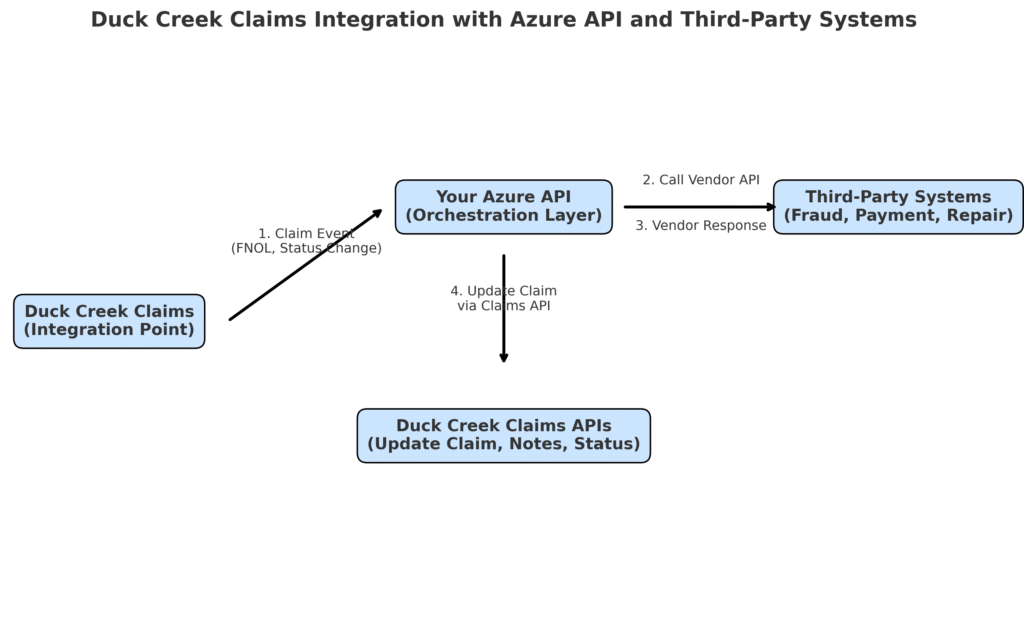
- Duck Creek Claims triggers your Azure API when certain claim events occur (e.g., FNOL submission, claim status change, payment request).
- Your Azure API orchestrates calls to third-party systems (fraud engines, repair networks, payment providers).
- Once responses are received, your API updates Duck Creek Claims back via Claims APIs (status updates, claim notes, attachments, etc.).
🔹 Architecture Diagram
Here’s how the architecture fits together:
🔹 Example Workflow
Step 1 – Claim Event in Duck Creek
A claim is created in Duck Creek (e.g., FNOL). Duck Creek sends the claim details to your Azure API:
{
  "claimId": "CLM1001",
  "lossType": "Auto",
  "claimAmount": 15000,
  "location": "Chicago, IL"
}
Step 2 – Your API Calls Third-Party Systems
Your Azure API forwards relevant claim data to vendors. Example:
Fraud Detection System
{
  "claimId": "CLM1001",
  "score": 82,
  "recommendation": "Manual Review"
}
Step 3 – Your API Updates Duck Creek Claims
Once vendor responses are received, your API uses Duck Creek Claims APIs to update the claim record.
Endpoint:
PATCH /claims/{claimId}
Payload:
{
  "status": "Fraud Review Pending",
  "notes": [
    {
      "author": "IntegrationAPI",
      "text": "Fraud score: 82 – manual review required"
    }
  ]
}
Duck Creek now reflects the updated status and notes.
🔹 Security Considerations
- OAuth2 Client Credentials – for authentication between Duck Creek and your Azure API.
- Azure Key Vault – store API secrets and certificates.
- mTLS (Mutual TLS) – for strict enterprise-grade security.
- APIM Policies – enforce throttling, request validation, and logging.
🔹 Error Handling & Resilience
- Retry Policies – Handle transient vendor failures.
- Dead Letter Queues (DLQ) – Use Azure Service Bus for async integrations.
- Error Mapping – Translate vendor errors into Duck Creek-friendly messages.
- Circuit Breakers – Prevent cascading failures during vendor outages.
🔹 Best Practices
- Abstract Vendors Behind Azure – Duck Creek always calls Azure, never directly to vendors.
- Version APIs – Ensure backward compatibility.
- Centralized Logging – Monitor with Azure Application Insights.
- Use Async for Long Processes – e.g., document generation, payment settlements.
🔹 Conclusion
By integrating Duck Creek Claims APIs with Azure-hosted APIs, insurers can:
✅ Keep Duck Creek focused on claims processing.
✅ Use Azure to securely manage vendor integrations.
✅ Scale, monitor, and evolve integrations with minimal disruption.
This architecture ensures that as new vendors are added or existing vendors change, you only update your Azure API layer, leaving Duck Creek workflows untouched. The result: a more agile, secure, and future-proof claims ecosystem.