Blog

How to Integrate Duck Creek Claims with Azure APIs to Connect Third-Party Systems

Insurance carriers today rely on seamless integrations between their core claims management platform and a network of third-party services — from fraud detection and payment processing to repair shops and regulatory bodies. With Duck Creek Claims (v12 and above) exposing REST APIs and Azure providing a powerful integration layer, you can build a scalable, secure, and resilient claims ecosystem.

In this article, we’ll walk through how to integrate Duck Creek Claims with an Azure-hosted API, orchestrate calls to third-party systems, and update claims back in Duck Creek.


🔹 Why Use Azure as the Integration Layer?

While Duck Creek can directly call external APIs, using Azure-hosted APIs as a middle layer offers multiple advantages:

  • Security & Governance – OAuth2, API keys, and Azure API Management (APIM).
  • Scalability – Azure App Services and Functions scale to handle high transaction volumes.
  • Vendor Abstraction – Duck Creek always talks to Azure, not directly to third parties.
  • Resilience – Built-in retries, circuit breakers, and async messaging with Service Bus.
  • Observability – Centralized logging with Azure Monitor & Application Insights.

🔹 Integration Flow

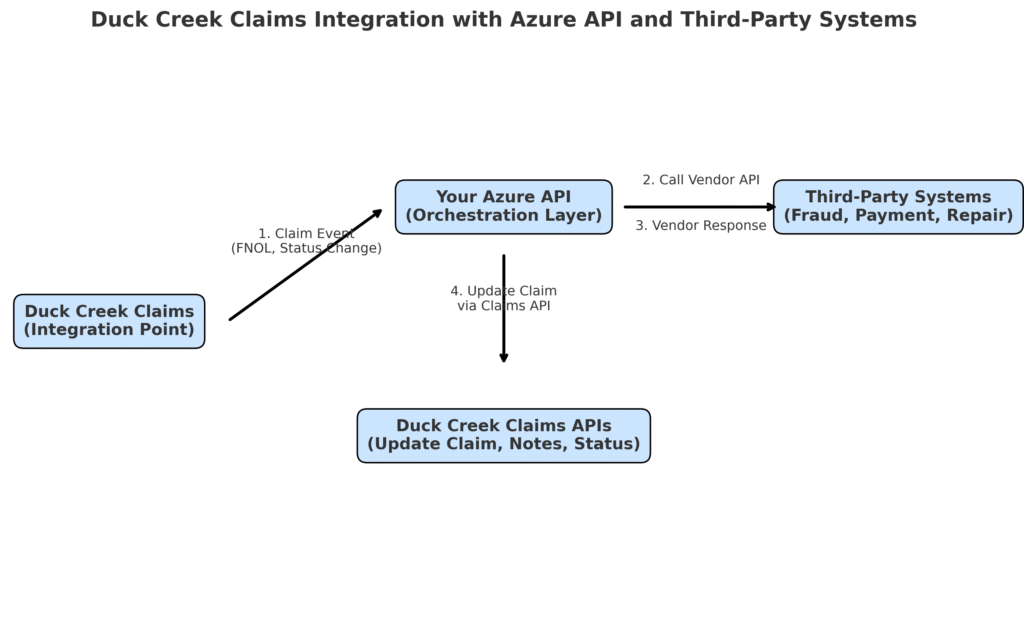
The integration pattern looks like this:

  1. Duck Creek Claims triggers your Azure API when certain claim events occur (e.g., FNOL submission, claim status change, payment request).
  2. Your Azure API orchestrates calls to third-party systems (fraud engines, repair networks, payment providers).
  3. Once responses are received, your API updates Duck Creek Claims back via Claims APIs (status updates, claim notes, attachments, etc.).

🔹 Architecture Diagram

Here’s how the architecture fits together:

🔹 Example Workflow

Step 1 – Claim Event in Duck Creek

A claim is created in Duck Creek (e.g., FNOL). Duck Creek sends the claim details to your Azure API:

{
  "claimId": "CLM1001",
  "lossType": "Auto",
  "claimAmount": 15000,
  "location": "Chicago, IL"
}

Step 2 – Your API Calls Third-Party Systems

Your Azure API forwards relevant claim data to vendors. Example:

Fraud Detection System

{
  "claimId": "CLM1001",
  "score": 82,
  "recommendation": "Manual Review"
}

Step 3 – Your API Updates Duck Creek Claims

Once vendor responses are received, your API uses Duck Creek Claims APIs to update the claim record.

Endpoint:

PATCH /claims/{claimId}

Payload:

{
  "status": "Fraud Review Pending",
  "notes": [
    {
      "author": "IntegrationAPI",
      "text": "Fraud score: 82 – manual review required"
    }
  ]
}

Duck Creek now reflects the updated status and notes.


🔹 Security Considerations

  • OAuth2 Client Credentials – for authentication between Duck Creek and your Azure API.
  • Azure Key Vault – store API secrets and certificates.
  • mTLS (Mutual TLS) – for strict enterprise-grade security.
  • APIM Policies – enforce throttling, request validation, and logging.

🔹 Error Handling & Resilience

  • Retry Policies – Handle transient vendor failures.
  • Dead Letter Queues (DLQ) – Use Azure Service Bus for async integrations.
  • Error Mapping – Translate vendor errors into Duck Creek-friendly messages.
  • Circuit Breakers – Prevent cascading failures during vendor outages.

🔹 Best Practices

  • Abstract Vendors Behind Azure – Duck Creek always calls Azure, never directly to vendors.
  • Version APIs – Ensure backward compatibility.
  • Centralized Logging – Monitor with Azure Application Insights.
  • Use Async for Long Processes – e.g., document generation, payment settlements.

🔹 Conclusion

By integrating Duck Creek Claims APIs with Azure-hosted APIs, insurers can:
✅ Keep Duck Creek focused on claims processing.
✅ Use Azure to securely manage vendor integrations.
✅ Scale, monitor, and evolve integrations with minimal disruption.

This architecture ensures that as new vendors are added or existing vendors change, you only update your Azure API layer, leaving Duck Creek workflows untouched. The result: a more agile, secure, and future-proof claims ecosystem.

Migrating to AWS: Strategies and Best Practices for Successful Application and Workload Migration


Migrating applications and workloads to the cloud has become a critical step for businesses seeking scalability, agility, and cost optimization. Amazon Web Services (AWS) provides a robust platform and a comprehensive set of services to support a smooth and successful migration journey. In this blog, we will explore strategies and best practices for migrating applications and workloads to AWS, helping businesses unlock the full potential of cloud computing.

  1. Assessing and Planning the Migration:
    • Understand Your Objectives: Clearly define your migration goals, such as cost reduction, improved scalability, enhanced performance, or increased security. This will help guide your migration strategy and decision-making process.
    • Evaluate Application Dependencies: Identify dependencies between applications and their underlying infrastructure. Determine if any adjustments or refactorings are necessary to ensure a smooth transition to the AWS environment.
    • Choose the Right Migration Approach: Select the most appropriate migration approach for each application or workload, considering factors such as complexity, criticality, and business impact. Common migration approaches include rehosting (lift and shift), re-platforming, and rearchitecting.
    • Create a Detailed Migration Plan: Develop a comprehensive migration plan that includes timelines, resource allocation, and a step-by-step process for migrating each application or workload. Consider conducting smaller, iterative migrations to minimize risks and validate the effectiveness of your approach

.

  1. Preparing for Migration:
    • Establish a Governance Framework: Define governance policies and procedures for cloud migration, including security, compliance, and cost management. Implement mechanisms for monitoring, tracking, and enforcing these policies throughout the migration process.
    • Optimize and Refactor Applications: Take advantage of AWS services and best practices to optimize your applications for the cloud. Consider refactoring applications to leverage cloud-native capabilities, such as serverless computing or managed databases, to improve performance and reduce costs.
    • c. Plan for Data Migration: Develop a strategy for migrating your data to AWS. Assess the volume, complexity, and dependencies of your data to determine the most efficient and secure migration approach. Consider using AWS Database Migration Service (DMS) or Snowball for large-scale data migrations.
    • d. Establish Security and Compliance Measures: Ensure that security controls, encryption mechanisms, and access management policies are in place before migrating sensitive data or applications. Leverage AWS Identity and Access Management (IAM) to define granular access permissions and implement best practices for secure cloud architecture.

  1. Executing the Migration:
    • Test and Validate: Conduct thorough testing of the migrated applications and workloads in the AWS environment. Verify that they function as expected, meet performance requirements, and integrate seamlessly with other systems.
    • Monitor and Optimize: Implement robust monitoring and logging mechanisms using AWS CloudWatch, AWS Config, and AWS CloudTrail. Continuously monitor the performance, cost, and security of your applications in AWS and optimize resource utilization as needed.
    • c. Train and Enable Teams: Provide adequate training and support to your IT teams to ensure they have the necessary skills to manage and operate applications in the AWS environment. Leverage AWS training resources and certifications to enhance their expertise.
    • d. Iterate and Learn: Embrace an iterative approach to migration and continuously learn from the migration process. Capture lessons learned and feedback to refine your migration strategy and improve future migrations.


Migrating applications and workloads to AWS opens up a world of possibilities for businesses, enabling scalability, agility, and cost optimization. By following the strategies and best practices outlined above, organizations can successfully navigate their migration journey and unlock the full potential of AWS cloud computing. Remember to assess and plan meticulously, optimize applications, establish robust security measures, execute with precision, and continuously monitor and optimize your migrated workloads. With the right approach,

AWS migration can propel your business towards digital transformation and ensure a competitive edge in the rapidly evolving technology landscape.

Machine Learning on AWS: Unleashing the Power of Artificial Intelligence with AWS Services

Machine Learning (ML) and Artificial Intelligence (AI) are transforming industries by enabling businesses to leverage data-driven insights, automate processes, and deliver personalized experiences. Amazon Web Services (AWS) offers a comprehensive suite of services that empower organizations to build, train, deploy, and manage machine learning models at scale. In this blog, we will explore the world of machine learning on AWS and discover how businesses can harness the power of AI with AWS services.

  1. Understanding Machine Learning on AWS:Machine Learning is a subset of AI that enables systems to learn and improve from data without being explicitly programmed. AWS provides a wide range of services that cater to various stages of the machine learning workflow, including data preparation, model training, deployment, and inference
  2. Key AWS Services for Machine Learning:
    • Amazon SageMaker: SageMaker is a fully managed service that simplifies the entire machine learning workflow. It provides a unified platform for data scientists and developers to build, train, and deploy ML models at scale. SageMaker supports popular ML frameworks and offers a range of built-in algorithms, making it easy to experiment and iterate on models.
    • Amazon Rekognition: Rekognition is a deep learning-based image and video analysis service. It can analyze images and videos for object recognition, facial analysis, text extraction, and scene understanding. Rekognition enables businesses to enhance content discovery, automate image moderation, and build immersive experiences.
    • Amazon Comprehend: Comprehend is a natural language processing (NLP) service that enables organizations to extract insights and relationships from text data. It can analyze text for sentiment analysis, key phrase extraction, entity recognition, and topic modeling. Comprehend helps businesses gain valuable insights from large volumes of text, automate content categorization, and improve customer support.
    • Amazon Forecast: Forecast is a fully managed service for time series forecasting. It uses machine learning algorithms to automatically generate accurate forecasts based on historical data. Forecast helps businesses optimize inventory, plan demand, and make data-driven decisions in industries such as retail, finance, and supply chain management.
    • Amazon Personalize: Personalize is a service that enables businesses to deliver personalized recommendations to their users. It uses ML algorithms to analyze user behavior and historical data, providing personalized product recommendations, content suggestions, and search results. Personalize helps businesses improve customer engagement, drive conversions, and enhance user experiences.
  3. Benefits of AWS Machine Learning Services:
    • Scalability and Performance: AWS ML services are designed to scale seamlessly as your data and model complexities grow. They leverage the underlying AWS infrastructure, providing high-performance computing resources and distributed processing capabilities, ensuring fast and efficient model training and inference.
    • Ease of Use and Productivity: AWS services simplify the ML workflow, providing intuitive interfaces, pre-built algorithms, and managed infrastructure. This allows data scientists and developers to focus on building models and experimenting with data, accelerating time-to-value and enhancing productivity.
    • Integration with AWS Ecosystem: AWS ML services seamlessly integrate with other AWS services, such as S3 for data storage, Lambda for serverless execution, and SageMaker for end-to-end ML workflows. This integration enables organizations to build comprehensive AI solutions and leverage the full AWS ecosystem for data analysis, storage, and deployment.
    • Security and Compliance: AWS places a strong emphasis on security and compliance. ML services on AWS provide encryption at rest and in transit, access control mechanisms, and compliance with industry standards and regulations. This ensures the privacy and protection of sensitive data used in ML models.
    • Cost-Effectiveness: AWS offers a pay-as-you-go pricing model for ML services, allowing businesses to only pay for the resources they consume. This eliminates the need for upfront infrastructure investments and provides cost flexibility as ML projects evolve.

Machine Learning on AWS empowers organizations to unlock the full potential of AI, drive innovation, and gain a competitive edge. With services like SageMaker, Rekognition, Comprehend, Forecast, and Personalize, businesses can harness the power of ML to analyze images, extract insights from text, forecast future trends, and deliver personalized experiences. By leveraging the scalability, ease of use, integration, security, and cost-effectiveness of AWS ML services, organizations can transform their data into valuable knowledge and make informed decisions that drive growth and success in the digital era.

AWS IoT: Exploring the Power of Internet of Things with AWS IoT Services


The Internet of Things (IoT) has transformed the way we interact with our physical surroundings, connecting devices, sensors, and machines to the internet to collect and exchange data. Amazon Web Services (AWS) offers a comprehensive suite of services known as AWS IoT, which enables businesses to build, deploy, and manage IoT applications at scale. In this blog, we will introduce you to the world of IoT and delve into the key AWS IoT services that empower organizations to harness the full potential of IoT for their digital transformation journey.

  1. Understanding IoT and its Significance:
    The Internet of Things refers to the network of physical devices embedded with sensors, software, and connectivity capabilities, enabling them to collect and exchange data over the internet. IoT has revolutionized various industries, including healthcare, manufacturing, agriculture, and smart homes, by providing real-time insights, automation, and remote control of devices. It has the potential to drive efficiency, enhance decision-making, and create new business opportunities by leveraging the power of data generated by connected devices.
  2. Key AWS IoT Services:
    • AWS IoT Core: AWS IoT Core is a managed cloud service that serves as the backbone of IoT deployments. It enables devices to securely connect and communicate with AWS cloud services. IoT Core supports multiple communication protocols and provides device management, authentication, and authorization features. It acts as a reliable and scalable infrastructure for IoT data processing and integration with other AWS services.
    • AWS IoT Analytics: IoT Analytics is a service that helps organizations gain insights from their IoT data. It enables the processing, visualization, and storage of IoT data for analysis. With IoT Analytics, businesses can derive meaningful insights, detect patterns, and make data-driven decisions. It also provides integration with machine learning services for predictive analytics.
    • AWS IoT Device Management: Device Management simplifies the onboarding, organization, and management of IoT devices at scale. It allows businesses to securely register, monitor, and update firmware or software of IoT devices. Device Management ensures device health, facilitates remote troubleshooting, and supports over-the-air updates, streamlining the device lifecycle management process.
    • AWS IoT Greengrass: Greengrass extends AWS services to local edge devices, enabling local data processing and decision-making capabilities. It provides a lightweight runtime that allows edge devices to run AWS Lambda functions and interact with AWS services even in offline or intermittent connectivity scenarios. Greengrass empowers businesses to deploy IoT applications closer to the edge, reducing latency and improving responsiveness.
    • AWS IoT Events: IoT Events enables the detection and response to events or anomalies in IoT data streams. It allows businesses to define rules and actions based on patterns or conditions in IoT data. IoT Events automates the detection of critical events, triggering alerts or initiating workflows for timely response and remediation.

  1. Benefits of AWS IoT:
    • Scalability and Flexibility: AWS IoT offers scalable and flexible infrastructure that can handle millions of devices and billions of messages. It enables businesses to easily scale their IoT deployments as their needs grow, ensuring seamless integration and management of IoT devices.
    • Security and Privacy: AWS IoT prioritizes security, providing end-to-end encryption, authentication, and access control mechanisms to protect IoT data and devices. It follows industry-standard security best practices, allowing businesses to build secure and compliant IoT solutions.
    • c. Edge Computing Capabilities: AWS IoT Greengrass enables local data processing and real-time decision-making at the edge, reducing latency and improving overall system responsiveness. This is particularly beneficial for use cases where real-time actions are required, or intermittent connectivity is a challenge.
    • d. Integration with AWS Services: AWS IoT seamlessly integrates with other AWS services, such as Lambda, DynamoDB, S3, and machine
    • learning services, enabling businesses to leverage the full AWS ecosystem for their IoT applications. This facilitates data analysis, storage, and integration with existing workflows and systems.
    • e. Accelerated Time-to-Market: AWS IoT provides pre-built functionality and easy-to-use services, allowing businesses to accelerate their time-to-market for IoT solutions. It abstracts away the complexity of infrastructure management, enabling organizations to focus on developing innovative IoT applications and use cases.


AWS IoT services empower businesses to harness the power of IoT and unlock new opportunities for innovation and growth. With AWS IoT Core, IoT Analytics, Device Management, Greengrass, and IoT Events, organizations can securely connect, manage, and analyze IoT data at scale. By leveraging AWS IoT services, businesses can gain real-time insights, drive operational efficiency, enhance customer experiences, and stay ahead in the rapidly evolving world of IoT. Whether you’re looking to build smart homes, industrial automation systems, or healthcare monitoring solutions, AWS IoT provides the foundation to transform your vision into reality.

AWS CloudWatch: Monitoring and Alerting for Enhanced Infrastructure Visibility


As businesses increasingly migrate their applications and infrastructure to the cloud, effective monitoring and alerting mechanisms become crucial for ensuring optimal performance, identifying issues, and maintaining the availability of critical resources. Amazon Web Services (AWS) offers a comprehensive monitoring solution called AWS CloudWatch. In this blog, we will delve into the capabilities and features of AWS CloudWatch and explore how it enables businesses to gain valuable insights into their AWS resources, set up proactive monitoring, and receive timely alerts.

  1. Understanding AWS CloudWatch:
    AWS CloudWatch is a monitoring and observability service that provides real-time insights into the performance and health of AWS resources and applications. It collects and tracks metrics, collects log files, sets alarms, and automatically reacts to changes in the environment. CloudWatch acts as a central hub for monitoring the AWS infrastructure and services, enabling businesses to gain a comprehensive view of their cloud-based environments.
  2. Key Features of AWS CloudWatch:
    • Metrics Monitoring: CloudWatch captures and monitors a wide range of metrics, such as CPU utilization, network traffic, disk usage, and latency. These metrics help assess the performance and health of various AWS services, EC2 instances, and custom applications.
    • Logs Monitoring: CloudWatch Logs enables the collection, storage, and analysis of log files from EC2 instances, AWS services, and custom applications. It helps businesses gain insights into system behavior, troubleshoot issues, and meet compliance requirements.
    • Dashboards: CloudWatch allows users to create customizable dashboards, visualizing relevant metrics and logs in a single view. Dashboards provide real-time insights into the performance of resources, enabling quick identification of anomalies and facilitating informed decision-making.
    • Alarms and Alerting: CloudWatch enables the creation of alarms based on predefined thresholds or custom conditions. These alarms can trigger notifications, such as email or SMS, allowing stakeholders to proactively respond to any performance or availability issues.
    • Autoscaling Integration: CloudWatch seamlessly integrates with AWS Auto Scaling, enabling the automatic adjustment of resources based on predefined thresholds. This ensures optimal resource utilization and responsiveness to changing workloads.
    • Events and Event Rules: CloudWatch Events allows users to monitor changes to AWS resources and respond to events in near real-time. It supports event-driven architectures and facilitates automation by triggering actions based on specific events.
    • Application Insights: CloudWatch Application Insights simplifies the monitoring of applications by automatically detecting and setting up dashboards and alarms for common application types, such as EC2, Elastic Beanstalk, and Lambda.
  1. Benefits of AWS CloudWatch:
    • Increased Visibility: CloudWatch provides a unified view of metrics, logs, and events across the AWS infrastructure. It empowers businesses to gain insights into resource utilization, application performance, and operational health, facilitating effective troubleshooting and optimization.
    • Proactive Monitoring and Alerting: CloudWatch’s alarm and alerting capabilities enable proactive monitoring of critical resources. Businesses can set up alarms based on predefined thresholds or custom conditions, ensuring timely notifications and allowing prompt remediation of issues.
    • Resource Optimization: With CloudWatch’s comprehensive monitoring capabilities, businesses can identify underutilized resources, optimize performance, and right-size their infrastructure. This leads to cost savings by eliminating unnecessary expenses on overprovisioned resources.
    • Enhanced Application Performance: CloudWatch’s application insights feature provides a holistic view of application performance and health. It helps identify bottlenecks, troubleshoot issues, and optimize applications for better user experiences.
    • Automation and Event Response: CloudWatch Events allow businesses to automate responses to specific events, enabling the execution of actions or workflows based on event triggers. This facilitates efficient incident response, reduces manual intervention, and enhances operational efficiency.


AWS CloudWatch is a powerful monitoring

and alerting service that empowers businesses to gain visibility into their AWS resources and applications. By leveraging CloudWatch’s metrics monitoring, log analysis, alarm and alerting features, businesses can proactively monitor and optimize their infrastructure, ensuring optimal performance, availability, and cost efficiency. With CloudWatch as a central monitoring hub, organizations can enhance their operational capabilities, streamline troubleshooting processes, and deliver exceptional user experiences in their cloud-based environments.

High Availability and Fault Tolerance in AWS: Designing and Implementing Resilient Architectures


In today’s digital landscape, system failures and downtime can have severe consequences for businesses, resulting in loss of revenue, reputation damage, and customer dissatisfaction. To mitigate such risks, Amazon Web Services (AWS) provides a range of services and architectural best practices for achieving high availability and fault tolerance. In this blog, we will explore the concepts of high availability and fault tolerance in AWS and discuss strategies for designing and implementing resilient architectures that can withstand failures and ensure continuous operation.

  1. Understanding High Availability and Fault Tolerance:
    • High Availability: High availability refers to the ability of a system to remain operational and accessible even in the face of component failures. In an AWS context, this means ensuring that applications and services are designed to minimize downtime and provide uninterrupted access to users.
    • Fault Tolerance: Fault tolerance goes beyond high availability by ensuring that a system can continue to operate correctly despite the failure of individual components or subsystems. It involves designing architectures that can automatically detect and recover from failures without impacting the overall system’s performance and functionality

  1. AWS Services for Achieving High Availability and Fault Tolerance:
    • Amazon Elastic Load Balancer (ELB): ELB distributes incoming traffic across multiple instances or Availability Zones, ensuring workload balancing and high availability. It automatically detects unhealthy instances and redirects traffic to healthy instances, minimizing disruptions caused by failures.
    • Amazon EC2 Auto Scaling: EC2 Auto Scaling allows you to automatically adjust the number of Amazon Elastic Compute Cloud (EC2) instances in response to demand. It ensures that your application can handle varying traffic loads by adding or removing instances based on predefined scaling policies.
    • Amazon Route 53: Route 53 is a highly scalable and reliable DNS (Domain Name System) web service. It can route traffic to multiple endpoints, such as EC2 instances, load balancers, or even external resources. Route 53’s health checks enable automatic failover to healthy endpoints, ensuring continuous availability.
    • Amazon RDS Multi-AZ: Amazon RDS provides Multi-AZ deployments for relational database instances. With Multi-AZ, a standby replica is automatically created in a different Availability Zone, ensuring data replication and automatic failover in case of a primary database failure.
    • AWS Lambda: Lambda is a serverless computing service that allows you to run code without provisioning or managing servers. By leveraging Lambda, you can design event-driven architectures and build resilient applications that automatically scale in response to events or failures.

  1. Best Practices for Designing Highly Available and Fault-Tolerant Architectures:
    • Multi-AZ Deployment: When deploying resources like EC2 instances, databases, or load balancers, consider using multiple Availability Zones. Distributing resources across different zones ensures redundancy and minimizes the impact of failures on your applications.
    • Load Balancing and Auto Scaling: Utilize ELB and EC2 Auto Scaling to distribute traffic evenly and automatically adjust capacity based on demand. This ensures workload balancing, fault tolerance, and efficient resource utilization.
    • Redundant Data Storage: Use AWS services like Amazon S3 for object storage and Amazon EBS (Elastic Block Store) for block storage. These services provide automatic replication and durability across multiple Availability Zones, minimizing data loss and enabling quick recovery.
    • Implement Automated Monitoring and Recovery: Leverage services like Amazon CloudWatch for monitoring system health and performance. Set up automated alarms to detect failures and trigger recovery processes, such as instance replacement or database failover.
    • Test Failure Scenarios: Regularly test your architecture’s resiliency by simulating failure scenarios and performing disaster recovery drills. This helps identify weaknesses and refine your recovery procedures to ensure they work as expected during actual failures.

Achieving high availability and fault tolerance is critical for building robust and resilient architectures in AWS. By leveraging the right combination of AWS services, such as Elastic Load Balancer, EC2 Auto Scaling, Route 53, RDS Multi-AZ, and Lambda, and adhering to best practices like multi-AZ deployments, load balancing, redundant data storage, and automated monitoring, businesses can ensure continuous operation even in the face of failures. With a well-designed and fault-tolerant architecture, organizations can minimize downtime, provide a seamless user experience, and safeguard their critical applications and services from unexpected disruptions.

Amazon RDS: A Detailed Look at Amazon Relational Database Service (RDS) for Managing Databases

In today’s digital age, data is the lifeblood of businesses, and effective database management is crucial for their success. Amazon Web Services (AWS), a leading cloud computing platform, offers a comprehensive solution for managing databases through Amazon Relational Database Service (RDS). RDS simplifies the process of setting up, operating, and scaling relational databases, allowing businesses to focus on their core operations. In this blog, we will explore the key features and benefits of Amazon RDS and understand why it has become a popular choice for managing databases.

  1. What is Amazon RDS?
    Amazon RDS is a managed database service provided by AWS that supports several popular relational database engines, including Amazon Aurora, PostgreSQL, MySQL, MariaDB, Oracle Database, and Microsoft SQL Server. It allows users to set up, operate, and scale a relational database in the cloud easily. With RDS, businesses can offload the complexities of database administration, such as hardware provisioning, database setup, software patching, backups, and monitoring, to AWS, thereby reducing administrative overhead and improving operational efficiency.
  2. Key Features of Amazon RDS:
    • Easy Setup and Administration: With Amazon RDS, users can launch a fully functional and scalable database instance in just a few clicks. RDS handles tasks like hardware provisioning, software installation, and database configuration, enabling users to focus on their application development rather than database administration.
    • Automated Backups and Point-in-Time Recovery: RDS provides automated backups of databases, ensuring data durability and recoverability. It allows users to define backup retention periods and takes snapshots of databases at regular intervals. Additionally, point-in-time recovery enables restoring databases to a specific point in time, aiding in data recovery and protection against accidental data loss.
    • High Availability and Fault Tolerance: Amazon RDS offers built-in features to enhance database availability and fault tolerance. It provides automated multi-AZ (Availability Zone) deployments, where a standby replica is automatically created in a different Availability Zone for failover purposes. This ensures minimal downtime and provides business continuity in the event of a hardware or software failure.
    • Scalability and Performance: RDS allows users to easily scale their databases up or down based on demand. It supports vertical scaling by enabling users to increase or decrease the compute and memory resources allocated to their database instances. Additionally, Amazon Aurora, a MySQL and PostgreSQL-compatible database engine offered by RDS, provides high-performance, scalable, and highly available database solutions.
    • Monitoring and Performance Insights: Amazon RDS provides comprehensive monitoring capabilities to track database performance and health. It offers metrics, such as CPU utilization, storage usage, and database connections, which can be monitored through Amazon CloudWatch. Moreover, Performance Insights provides detailed visibility into database performance, helping identify and troubleshoot performance bottlenecks.
  1. Benefits of Amazon RDS:
    • Cost-Effectiveness: By leveraging the pay-as-you-go pricing model, Amazon RDS allows businesses to avoid upfront infrastructure costs and pay only for the resources they consume. It eliminates the need for hardware procurement, maintenance, and software licensing, resulting in significant cost savings.
    • Security and Compliance: RDS incorporates robust security features to protect data. It offers network isolation using Amazon Virtual Private Cloud (VPC) and encryption at rest using AWS Key Management Service (KMS). RDS is compliant with various industry standards, including HIPAA, GDPR, and PCI DSS, making it suitable for hosting sensitive data.
    • Automated Software Patching: RDS takes care of software patching, ensuring that the databases are running on the latest stable versions. This eliminates the need for manual patching and ensures that the databases are protected against known vulnerabilities.
    • Global Availability: Amazon RDS enables businesses to deploy databases in multiple AWS regions globally, allowing them to serve their customers with low latency and high availability. It supports cross-region replication for disaster recovery and read replicas for offloading read traffic.


Amazon RDS is a powerful and user-friendly solution for managing relational databases in the cloud. It simplifies database administration tasks, provides automated backups and high availability, and offers scalability and performance options. With its cost-effectiveness, security features, and global availability, RDS has become a preferred choice for businesses looking to leverage the benefits of a managed database service. By adopting Amazon RDS, organizations can streamline their database operations, focus on their core competencies, and accelerate their digital transformation journey.

Deep Dive into AWS VPC: Exploring the AWS Virtual Private Cloud (VPC) and its Networking Capabilities

In today’s era of cloud computing, organizations are increasingly embracing the flexibility and scalability provided by cloud service providers. Amazon Web Services (AWS) is a leading provider in this domain, offering a wide range of services to meet diverse business needs. One of the foundational services provided by AWS is the Virtual Private Cloud (VPC), which allows users to build and manage their own isolated network environments within the AWS cloud. In this blog, we will take a deep dive into AWS VPC, exploring its core concepts, components, and networking capabilities.

Understanding AWS VPC

AWS VPC is a logically isolated section of the AWS cloud, where users can launch their own virtual network environments. It provides a high level of control over the network configuration, allowing users to define IP address ranges, create subnets, and configure routing tables and network gateways. With AWS VPC, organizations can create their own private and secure network space within the AWS infrastructure, replicating the traditional on-premises network architecture.

Key Components of AWS VPC

  1. Subnets: Subnets are the building blocks of AWS VPC. They represent a range of IP addresses within the VPC and are associated with a particular availability zone (AZ). Subnets allow the segmentation of the network and help in organizing resources within a VPC.
  2. Route Tables: Route tables define the rules for routing network traffic within the VPC. Each subnet is associated with a route table, which determines how traffic is directed between subnets or to external networks.
  3. Internet Gateway: An internet gateway enables communication between instances within a VPC and the internet. It acts as a gateway for inbound and outbound traffic and allows instances to have public IP addresses.
  4. NAT Gateway: Network Address Translation (NAT) gateways allow instances within private subnets to connect to the internet for updates, patches, or accessing external services, while still keeping them isolated from inbound connections.
  5. Security Groups and Network Access Control Lists (ACLs): Security groups and ACLs provide security at the network level. Security groups control inbound and outbound traffic for instances, while ACLs provide an additional layer of control by allowing or denying traffic at the subnet level.

Networking Capabilities of AWS VPC

  1. VPC Peering: VPC peering allows users to connect two VPCs together, enabling communication between instances in different VPCs using private IP addresses. This feature is useful for scenarios such as multi-region deployments or connecting VPCs from different AWS accounts.
  2. VPC Endpoints: VPC endpoints provide a secure and direct connection between VPCs and AWS services without the need for internet gateways or NAT gateways. This allows instances within a VPC to access AWS services, such as Amazon S3 or DynamoDB, privately and securely.
  3. VPN Connections: AWS VPC supports Virtual Private Network (VPN) connections, which establish encrypted tunnels between on-premises networks and VPCs. This enables organizations to extend their existing network infrastructure into the AWS cloud, creating a hybrid network environment.
  4. Transit Gateway: The AWS Transit Gateway simplifies network connectivity between multiple VPCs and on-premises networks. It acts as a hub that enables centralized management of network routing and allows for the seamless and scalable interconnection of VPCs.

AWS VPC provides a robust and flexible networking foundation for building scalable and secure cloud infrastructures. By leveraging its core components and networking capabilities, organizations can design and deploy complex network architectures tailored to their specific requirements. Whether it’s creating isolated environments, establishing connectivity between VPCs, or extending on-premises networks into the cloud, AWS

VPC offers a comprehensive set of tools and features to meet these needs. As organizations continue their cloud journey, understanding and harnessing the power of AWS VPC becomes increasingly vital in building resilient and efficient cloud-based solutions.

Introduction to AWS CloudFormation: An Introduction to Infrastructure as Code

In today’s rapidly evolving digital landscape, the demand for efficient and scalable cloud infrastructure is on the rise. Managing infrastructure resources manually can be time-consuming, error-prone, and difficult to replicate. To address these challenges, Amazon Web Services (AWS) provides an invaluable service called AWS CloudFormation. With CloudFormation, developers and system administrators can automate the provisioning and management of AWS resources, treating infrastructure as code.

This blog post aims to provide you with a comprehensive introduction to AWS CloudFormation, highlighting its key features, benefits, and how it simplifies the process of managing and deploying infrastructure.

What is AWS CloudFormation?

AWS CloudFormation is a service that allows you to define and deploy your AWS infrastructure resources using a declarative template. It enables you to describe your infrastructure requirements in a simple text file format known as a CloudFormation template. This template acts as a blueprint for your entire stack, detailing the necessary AWS resources, their configurations, and interdependencies.

Infrastructure as Code (IaC):

At its core, CloudFormation embodies the concept of Infrastructure as Code (IaC), which involves managing and provisioning infrastructure resources using code rather than manual processes. By treating infrastructure as code, CloudFormation offers numerous advantages, including version control, reproducibility, and scalability.

Key Features of AWS CloudFormation:

  1. Declarative Templates: CloudFormation uses YAML or JSON templates, allowing you to define your infrastructure resources and their properties in a human-readable format. These templates can be version-controlled, reviewed, and shared, providing a source of truth for your infrastructure.
  2. Resource Provisioning and Management: CloudFormation simplifies the provisioning and management of AWS resources. It automatically handles the creation, updating, and deletion of resources, ensuring consistent configurations and minimizing the risk of manual errors.
  3. Stack Management: A CloudFormation stack represents a collection of AWS resources provisioned and managed together. You can create, update, and delete stacks, enabling you to manage your infrastructure as a single unit. This facilitates easy management of complex systems with interdependent resources.
  4. Dependency Management: CloudFormation automatically manages resource dependencies based on the information provided in the template. It ensures that resources are provisioned in the correct order, considering dependencies between them.
  5. Rollback and Drift Detection: CloudFormation tracks changes made to stacks and can perform automatic rollback if an update fails. It also provides drift detection, alerting you if there are any manual modifications to resources provisioned through CloudFormation.

Benefits of AWS CloudFormation:

  1. Automation and Reproducibility: By defining infrastructure as code, CloudFormation enables automation and reproducibility. You can easily create and recreate infrastructure stacks, reducing the time and effort required for provisioning and configuration.
  2. Consistency and Scalability: CloudFormation ensures consistent configurations across your infrastructure, eliminating manual errors and reducing operational risks. It also allows you to scale your infrastructure effortlessly by modifying your templates and updating your stacks.
  3. Simplified Management: With CloudFormation, you can manage complex systems as a whole, simplifying the management of resources and their dependencies. It provides a centralized view of your infrastructure, making it easier to troubleshoot and maintain.
  4. Integration with AWS Services: CloudFormation integrates seamlessly with various AWS services, including EC2, S3, RDS, IAM, and many more. This allows you to provision and configure resources from different AWS services in a unified and orchestrated manner.

AWS CloudFormation is a powerful service that revolutionizes the way we manage and deploy infrastructure in the cloud. By embracing the concept of Infrastructure as Code, CloudFormation brings automation, reproducibility, and scalability to your AWS infrastructure. Its declarative templates, resource provisioning, and stack management capabilities simplify

the process of infrastructure deployment and maintenance. Whether you are managing a small application or a complex architecture, CloudFormation can significantly enhance your infrastructure management workflows and boost your operational efficiency.

So, start exploring AWS CloudFormation and unlock the potential of infrastructure as code for your cloud infrastructure management.

Building Scalable Applications on AWS: Strategies and Techniques


In today’s fast-paced digital world, building scalable applications is crucial for businesses to meet growing demands and ensure a seamless user experience. Amazon Web Services (AWS) provides a comprehensive suite of services and tools that enable developers to build highly scalable and robust applications. In this blog, we will explore the strategies and techniques for building scalable applications on AWS.

  1. Design for Scalability:
    To build scalable applications on AWS, it is essential to adopt a scalable architecture from the very beginning. The key principles include:
    • Loose Coupling: Design your application components to be loosely coupled, allowing them to scale independently. This promotes modularity and reduces dependencies.
    • Stateless Architecture: Avoid storing session data on application servers. Instead, use services like AWS Elastic Load Balancer (ELB) and Amazon Simple Queue Service (SQS) to manage session data and achieve horizontal scalability.
    • Microservices: Break down your application into small, independent microservices that can be developed, deployed, and scaled independently. This approach enables you to allocate resources more efficiently and scale specific services based on demand.
  1. Elastic Compute with Auto Scaling:
    AWS Auto Scaling allows you to automatically adjust the number of EC2 instances based on application demand. By defining scaling policies and setting up thresholds, you can ensure your application has the necessary resources to handle traffic spikes and scale down during periods of low demand. Auto Scaling integrates seamlessly with other AWS services like Elastic Load Balancer and CloudWatch to dynamically manage your infrastructure.
  2. Serverless Architecture:
    AWS Lambda, a serverless computing service, enables you to focus on writing code without worrying about infrastructure management. With Lambda, you can break down your application into small, event-driven functions that scale automatically based on demand. This pay-as-you-go model ensures efficient resource utilization and eliminates the need to provision and manage servers.
  3. Database Scaling:
    As application traffic grows, it is crucial to ensure that your database can handle the load. AWS offers various scalable database services such as Amazon Relational Database Service (RDS), Amazon DynamoDB, and Amazon Aurora. These services provide automated scaling, high availability, and managed backups, enabling you to scale your database seamlessly without compromising performance.
  4. Content Delivery and Caching:
    To improve the performance of your application, leverage AWS services like Amazon CloudFront for content delivery and Amazon ElastiCache for caching. CloudFront allows you to distribute content globally, reducing latency and improving the user experience. ElastiCache provides in-memory caching capabilities, reducing the load on your application servers and improving response times.
  5. Monitoring and Performance Optimization:
    AWS offers a range of monitoring and performance optimization tools to help you identify bottlenecks, optimize resource usage, and ensure the scalability of your applications. Services like Amazon CloudWatch, AWS X-Ray, and AWS Trusted Advisor provide insights into system performance, resource utilization, and potential areas for improvement.
  6. Infrastructure as Code:
    Adopting Infrastructure as Code (IaC) practices using AWS CloudFormation or AWS CDK (Cloud Development Kit) allows you to define your infrastructure in a declarative manner. This approach enables you to version, manage, and replicate your infrastructure easily. It also facilitates the automation of deployment and scaling processes, ensuring consistency and scalability across environments.


Building scalable applications on AWS requires careful planning and implementation of scalable architecture patterns. By leveraging AWS services like Auto Scaling, Lambda, RDS, CloudFront, and CloudWatch, developers can design and deploy applications that can handle high traffic volumes and scale seamlessly. Incorporating these strategies and techniques will help you build robust and scalable applications, ensuring a superior user experience and the ability to adapt to changing business needs in the dynamic cloud environment provided by AWS.